
| Home | WikiLEC | Repairs | Upgrades | Gallery | Buy & Sell | Mountain Chips | Meets & Events | Contact |
|
Elan Scan It comm port inactive
Moderators: theelanman, dapinky, Specky, clemo, Nige, Sy V, Dave Eds, DaveT, Elanlover, muley, Enright, algirdas, nitroman, GeoffSmith
6 posts
• Page 1 of 1
Elan Scan It comm port inactive
 by correia75 » Wed 21.01.2026, 15:34
Hello everyone, after installing Elan Scan It, the Matt version that I downloaded here from the forum (LEC), which should be compatible with my Windows 11, it stopped showing the message “no frame start byte received, no reply” and now shows “comm port inactive”. Can anyone help me? 
- correia75
- Newbie
- Posts: 3
- Joined: Wed 21.01.2026, 13:06
Re: Elan Scan It comm port inactive
by RonR » Thu 22.01.2026, 18:09
Your USB Elanscan cable has most probably taken a different Com port to the one you used before. You need to open 'Device Manager' and look under 'Ports (COM & LPT)' to see which port is active.
Once you have that, open Elanscan, choose 'Setup' and set the comm port to the one from Device Manager.
Once you have that, open Elanscan, choose 'Setup' and set the comm port to the one from Device Manager.
-

RonR - Fanatic
- Posts: 723
- Joined: Mon 22.08.2016, 20:25
- Location: Bromley
Re: Elan Scan It comm port inactive
by correia75 » Fri 23.01.2026, 12:53
RonR wrote:Your USB Elanscan cable has most probably taken a different Com port to the one you used before. You need to open 'Device Manager' and look under 'Ports (COM & LPT)' to see which port is active.
Once you have that, open Elanscan, choose 'Setup' and set the comm port to the one from Device Manager.
Hello,
Thank you for your reply.
I have checked Device Manager and I am using the correct COM port, which is also correctly set in Elanscan as advised.
However, the error “frame start byte received, no reply” is still appearing. Elanscan does show some values, but only a few, and they seem incomplete.
Additionally, the temperature is displayed as -40 °C, and I am not sure whether this is a software/communication issue or if it could indicate a problem with the car’s temperature sensor.
If you have any further suggestions on what else I should check (settings, baud rate, cable, ECU, etc.), I would appreciate it.
Kind regards
- correia75
- Newbie
- Posts: 3
- Joined: Wed 21.01.2026, 13:06
Re: Elan Scan It comm port inactive
by chrism » Fri 23.01.2026, 14:28
correia75 there's a 'sticky' on the ElanScan thread called ElanScan_beta_USB - new for 2024 containing the very latest EScan updates.
Did you use the new 'ElanScan_beta_USB' software and 'new M100 ALDL protocol' files cos these are the latest, uprated, files for the later versions of win10 and all versions of win11. I seem ro remember that the wrong -40C temp display was 'ironed out' by RonR before these 'sticky' updates...
Did you use the new 'ElanScan_beta_USB' software and 'new M100 ALDL protocol' files cos these are the latest, uprated, files for the later versions of win10 and all versions of win11. I seem ro remember that the wrong -40C temp display was 'ironed out' by RonR before these 'sticky' updates...
-
chrism - God
- Posts: 923
- Joined: Sun 16.01.2022, 14:36
- Location: West Sussex, UK
Re: Elan Scan It comm port inactive
by RonR » Fri 23.01.2026, 17:34
If your Elanscan reading of -40 °C is correct (please check once you have an error-free session) it means you have no temperature reading from the sensor. Either the sensor is faulty or there's a wiring issue between the ECU and the sensor.
You can check the sensor by measuring the resistance between the sensor terminals - see here for details: https://wikilec.com/view/Coolant_Temperature_Sensor_(CTS)
You can check the sensor by measuring the resistance between the sensor terminals - see here for details: https://wikilec.com/view/Coolant_Temperature_Sensor_(CTS)
-
RonR - Fanatic
- Posts: 723
- Joined: Mon 22.08.2016, 20:25
- Location: Bromley
Re: Elan Scan It comm port inactive
by chrism » Fri 23.01.2026, 18:18
correia, is this your original EScan? I clicked on the image right at the end of your original post and found this on a tab...
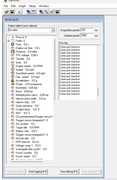
If it is, there's no data registered at all with this set-up and, it seems to me, would support Ron's 'no-com-port' thought?
(If it isn't, I haven't a clue where it came from )
)
Edit: Yes it is yours. The image didn't open when I clicked on it but it did I when I clicked on 'open in a new tab'....
ps I cant see the -40C or the later-in-post Error log messages; is this the image that you wanted to send, I wonder?
If it is, there's no data registered at all with this set-up and, it seems to me, would support Ron's 'no-com-port' thought?
(If it isn't, I haven't a clue where it came from
)Edit: Yes it is yours. The image didn't open when I clicked on it but it did I when I clicked on 'open in a new tab'....
ps I cant see the -40C or the later-in-post Error log messages; is this the image that you wanted to send, I wonder?
-
chrism - God
- Posts: 923
- Joined: Sun 16.01.2022, 14:36
- Location: West Sussex, UK
6 posts
• Page 1 of 1
Who is online
Users browsing this forum: No registered users and 2 guests