elan scan drivers

Moderators: theelanman, dapinky, Specky, clemo, Nige, Sy V, Dave Eds, DaveT, Elanlover, muley, Enright, algirdas, nitroman, GeoffSmith

Re: elan scan drivers

Postby chrism » Sun 10.09.2023, 21:18

Yep absolutely agree with your sequence Ron. I used my updated win 10 -> win11 version of ES as well outside of the VM. Both usb2 and usb3 on my elderly l/top gave data acquisition so I think there was some driver 'overkill' there :)

A couple of things that come from all this trial and error is that, hopefully, fellow LEC-ers won't need to duplicate all this stuff - unless they really want to :shock: - and win11 doesn't need to paralyze us with ES 'cold turkey.'

We can still get our 'fix' :wink: in at least a couple of ways, I reckon.

Edit: another option I'm going explore is a usb2/usb3 converter -> serial port since my old laptop has one of these as well as usb2 and usb3. But are the latest l/tops being sold with serial ports, now, or will 'progress' take this option out of contention? Let's hope that whatever takes their place is better backward-compatible than usb3 and that there's lots of better info available.
User avatar
chrism
God
 
Posts: 894
Joined: Sun 16.01.2022, 14:36
Location: West Sussex, UK

Re: elan scan drivers

Postby RonR » Fri 08.12.2023, 00:55

Just came across another FTDI document which describes the way the Serial and USB sides of things interact - AN232B-04 Data Throughput, Latency and Handshaking
https://www.ftdichip.com/Documents/AppN ... cyFlow.pdf

It's not pretty when you only have serial data and no other signals to tell the chip when to send or receive.

I'll try to tweak the driver parameters to take account of this and put the results up here.
User avatar
RonR
Fanatic
 
Posts: 723
Joined: Mon 22.08.2016, 20:25
Location: Bromley

Re: elan scan drivers

Postby RonR » Fri 08.12.2023, 17:18

So... I read and (mostly) understood the FTDI document, and set about coming up with a usable Advanced Configuration for the Virtual Comm port.

Because the Elan ECU doesn't have "Modem control" type signals (CTS, DTR, etc) and doesn't use flow control in the data stream, there's no way for the USB/FTDI drivers to know if/when an ES data "Packet" is complete. The data builds up in the USB Buffer and is only sent when it fills up or the latency timer expires.

So we're reliant on the USB Buffer sizes and the Latency timer to dictate when the FTDI drivers pass data to the ECU or the Elanscan program. As the document says, you have to strike a balance between Buffer sizes and Latency timer to give the best results.

Our largest received data packet for ES is 67 Bytes, so we don't need a huge buffer size and can safely choose 128, for sending the request it's only 4 bytes, so the smallest buffer available is 64, which will do.

Elanscan sends the request for data to the ECU then waits a certain (unknown) time for the reply, after which it reports "No Reply". Ideally the latency timer needs to be set shorter than that time, but long enough so that we don't receive partial packets. By trial and error I found a range where errors were at a minimum, from 40 to 75 milliseconds, so to be on the safe side I've used 50ms.

Using Trevor's Elanscan cable plugged into a USB3 port on my Win10 Laptop I managed to get 20 minutes of Elanscan data with no errors at all - The settings were:
Win10-USB3-ComX-Advanced.jpg

Could a Win11 & USB3 user who hasn't been able to get reliable data please try these settings and report back please?
You do not have the required permissions to view the files attached to this post.
User avatar
RonR
Fanatic
 
Posts: 723
Joined: Mon 22.08.2016, 20:25
Location: Bromley

Re: elan scan drivers

Postby chrism » Sat 09.12.2023, 13:24

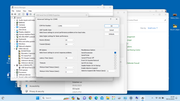
Image

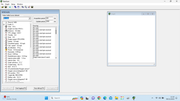
Image


RonR these are my details. (If the pics aren't big enough I can resend in a different way; pls let me know)

Send + receive are both 64Bytes and I changed latency to t0 50 (from 32ms) after your most recent post. As of this morning ES 'talks' so I'm assuming it'll 'log'...

The error log is messy, as always, but I'm no expert with ES - this may be normal if there are no faults(?)


I ought to point out that, like you, I tried to get ES running in loadsa different windows versions and found that it runs okay in win7, I think you tried win8, but I think we both found that the very latest version that'll run ES is a clean install of the earliest version of win10. Later clean (freshly loaded) versions 'don't play ball'...

There are LEC posts on this. My current working win11 has been auto-updated from that early oem win10 usb stick and we found that later 'straight-in'/clean options of win10 and win11 wouldn't run ES. Like you I also found that ES can be made to run 'virtually' by loading win7 into a win11 compartment using VMware and running 'ES-in-win7-within-win11-virtually' :shock: so we can access ES - even though the most recent laptops only offer win11/usb3 atm.

I'm assuming that the very latest win11 update will work - my laptop is still running the previous version. Since it's a dinosaur I have to clone the ssd from my up-to-date PC to get win11 into it and I haven't got around to doing that yet...

Hope this helps in the interim before others respond :)
Last edited by chrism on Sat 09.12.2023, 16:38, edited 3 times in total.
User avatar
chrism
God
 
Posts: 894
Joined: Sun 16.01.2022, 14:36
Location: West Sussex, UK

Re: elan scan drivers

Postby chrism » Sat 09.12.2023, 13:59

Cropped + enlarged anyway...

Screenshot (20).jpg
Screenshot (25).jpg
You do not have the required permissions to view the files attached to this post.
User avatar
chrism
God
 
Posts: 894
Joined: Sun 16.01.2022, 14:36
Location: West Sussex, UK

Re: elan scan drivers

Postby RonR » Sat 09.12.2023, 18:24

Hi Chris,

Could you try setting the receive buffer to 128 bytes please?

The incoming Elanscan data is 63 bytes but the 4-byte request is also echoed back from the ECU, so by having the buffer set to 64 you will need 2 USB data transfers per request. By selecting 128 you only need 1 transfer.

Caveat: I only have 1 laptop with USB3 so I have no idea if the Latency timer value is hardware-specific or software/driver specific or none of the above! However I have tried with a stand-alone FTDI chip as I wondered if the Elanscan cable's isolation circuitry could be to blame (it wasn't).
User avatar
RonR
Fanatic
 
Posts: 723
Joined: Mon 22.08.2016, 20:25
Location: Bromley

Re: elan scan drivers

Postby chrism » Sat 09.12.2023, 22:00

Hi Ron. Yep already done and I'll post an m100 print-out asap tomorrow - the neighbours won't appreciate a running engine this time of night...

Btw should I be getting all those 'No reply/No frame start byte received' messages in the Error log column? (We're thin on the ground, aren't we? And there's nobody around to do a 'mine's bigger than yours' with :() I reckon it'd help, too, if you posted yours up as an example for those of us newbies just starting out. I won't know what to do, either, if it tells me I've got a fault...(I bet there's an 'Idiot's Guide to ElanScan' tucked away somewhere on LEC that I haven't found yet!)

ps My dinosaur Thinkpad x230 win11 l/top has 1 x usb2, 2 x usb3 and a serial port. Is there another port I can use to help provide info? I can't remember loading separate FTDI drivers with the ES install and I seem to remember that ES runs in both usb2 and usb3 on my dinosaur.

pps I've got a nagging feeling that the receive buffer was actually set to 128Byte when I had ES working a few months ago and I changed it to 64Byte to see if it made a difference - then left it there cos it didn't seem to - and I was getting exactly the same Error log stuff as on my most recent post. ie the pessimist in me is not expecting a change. All the engine data figures seem to have been acquired in every iteration when it's acually been working tho'...
User avatar
chrism
God
 
Posts: 894
Joined: Sun 16.01.2022, 14:36
Location: West Sussex, UK

Re: elan scan drivers

Postby chrism » Sun 10.12.2023, 12:35

An update RonR.

I've just run the ES process on the car again and Receive Bytes set at 128 instead of 64 makes no real difference, except the Error log details seem to scroll down more slowly. ES talks and acquires as before; I won't even post the details cos the pic is the same as my previous post.

I've returned my Receive value back to 64 'cos that's how it was before. Looks like this is as good as it gets courtesy of win11 + usb3? :(
User avatar
chrism
God
 
Posts: 894
Joined: Sun 16.01.2022, 14:36
Location: West Sussex, UK

Re: elan scan drivers

Postby RonR » Mon 11.12.2023, 14:19

Hi Chris,
chrism wrote:the Error log details seem to scroll down more slowly.


So it looks like you're getting fewer missed data packets with the receive buffer at 128.

My Win10 laptop was able to reliably receive data with the Latency timer between 40 and 77, but if I increased it to 78 I got loads of errors.
Could you have a try at 77 and 78 to see if yours is the same on Win11 please? I need to find out if the timer setting produces different results on Win10 and Win11.

Meanwhile I have a different USB to Serial converter on order - It uses a different chip so doesn't need extra drivers in Windows.
If it works out it could be a cheap way to modify elanscan cables to work with modern computers.
User avatar
RonR
Fanatic
 
Posts: 723
Joined: Mon 22.08.2016, 20:25
Location: Bromley

Re: elan scan drivers

Postby chrism » Mon 11.12.2023, 15:54

Ok RonR so I'll change back to a receive buffer of 128 and expect to receive slower but larger data packets.

I'll get win11/usb3 data values with latency adjusted from 50 ms to 77 then 78 and report back asap, probably tomorrow.

That different usb -> serial converter sounds interesting; presumably not FTDI? I'm sure I echo many LEC-ers offering my thanks for your innovative efforts to get our EScans back into the win11/usb3 (and beyond) era :)

Btw as a relative newbie I haven't seen ES working 'properly'. Should I be seeing all that guff in my Error log column or should it be clear?
User avatar
chrism
God
 
Posts: 894
Joined: Sun 16.01.2022, 14:36
Location: West Sussex, UK

Re: elan scan drivers

Postby chrism » Mon 11.12.2023, 16:51

Ok RonR so I'll change back to a receive buffer of 128 and expect to receive slower but larger data packets.

I'll get win11/usb3 data values with latency adjusted from 50 ms to 77 then 78 and report back asap, probably tomorrow.

That different usb -> serial converter sounds interesting; presumably not FTDI? I'm sure I echo many LEC-ers offering my thanks for your innovative efforts to get our EScans back into the win11/usb3 (and beyond) era :)

Btw as a relative newbie I haven't seen ES working 'properly'. Should I be seeing all that guff in my Error log column or should it be clear?


UPDATE: Latency 77 was exactly the same as latency 50 ie 'No frame start byte received/No reply' and latency 78 was the same except third line down was one line of 'Reply mode doesn't match' then back to 'No frame...no reply' duplicated as before. In all cases data was read okay; temp went up etc...
User avatar
chrism
God
 
Posts: 894
Joined: Sun 16.01.2022, 14:36
Location: West Sussex, UK

Re: elan scan drivers

Postby RonR » Wed 13.12.2023, 14:44

Hmmm...

Thanks for yet again being the Guinea-Pig Chris.

My laptop saw many, many errors and didn't log any meaningful data at all at 78ms - so 78ms doesn't seem to be a hard-and-fast cut-off point.

I think the next thing I'll try is the non-FTDI serial to USB interface, based on a CH9102F chip - it should arrive here from China in a week or so.

Elanscan error log should be blank if everything's working well.
User avatar
RonR
Fanatic
 
Posts: 723
Joined: Mon 22.08.2016, 20:25
Location: Bromley

Re: elan scan drivers

Postby chrism » Wed 13.12.2023, 16:45

I'm by no means an expert but if ES was originally designed for a series port, FTDI provided a usb2 'work around' and usb3/win11 has found some flaws then in my mind the FDTI solution has run it's course.

So...a different serial to usb solution rather than a 'sticking plaster' might seem the best area to focus on; I've got my fingers crossed.

Again, let me know how I can help in your quest, RonR :)

ps I've never seen a blank ES Error log, but then I joined the party in win10.
User avatar
chrism
God
 
Posts: 894
Joined: Sun 16.01.2022, 14:36
Location: West Sussex, UK

Re: elan scan drivers

Postby KenS » Wed 13.12.2023, 17:11

Chris, do you fancy trying a Bluetooth version? Needs careful pairing and pointing Elanscan at the correct resulting comms port, but it isn't reliant on the FTDI drivers, only been run on Win10 ver 22H2 so far but seems OK. I can get one in the post tomorrow - would need postal address by PM.
S2 M100 NMY #285
N/A 2010 Evora
User avatar
KenS
Fanatic
 
Posts: 278
Joined: Mon 27.10.2014, 21:04
Location: North Kent Coast

Re: elan scan drivers

Postby chrism » Wed 13.12.2023, 19:27

Hi KenS. Yes that sounds a worthwhile option whilst awaiting the RonR's chip solution/trials; I feel we ought to try to crack the win11/usb3 problem before ES fades away...

I'll PM my address and you'll have to let me know how to refund your postal costs.

Does this mean your bluetooth version will be able to talk to ES on my win11/usb3 laptop? Forgive my newbie-ness. I've used the 'Torque' app via bluetooth on my Android phone with my previous MINI and MGTF135 but that was at least 4 years ago - and that's my only previous experience of bluetoothy car stuff :shock:

Ken - I've sent a copy of this and my contact details via email not PM
User avatar
chrism
God
 
Posts: 894
Joined: Sun 16.01.2022, 14:36
Location: West Sussex, UK

Re: elan scan drivers

Postby KenS » Wed 13.12.2023, 20:52

Chris - Hopefully the bluetooth drivers allow consistant ElanScan performance on Win10 and Win11. Shall I send a Bluetooth PC USB dongle or are you already Bluetooth capable? I'll get the package + instructions in the post tomorrow.
S2 M100 NMY #285
N/A 2010 Evora
User avatar
KenS
Fanatic
 
Posts: 278
Joined: Mon 27.10.2014, 21:04
Location: North Kent Coast

Re: elan scan drivers

Postby chrism » Thu 14.12.2023, 00:13

Yes please Ken send the working dongle too.

I can always send it back if I find mine, you know it's fit for purpose and (sorry but) it'll take out the prospect of wrangling something that's not compatible because I don't know any better... :-)
User avatar
chrism
God
 
Posts: 894
Joined: Sun 16.01.2022, 14:36
Location: West Sussex, UK

Re: elan scan drivers

Postby chrism » Fri 15.12.2023, 11:39

Hi Ken, your BTElanscan module + usb dongle have just arrived thanks. Hats off to courier, incredibly quick.

Your written instructions are a breeze to follow :D It looks like my dongle will work. Both yours and mine are recognized as 'Generic Bluetooth Radio'. Yours has bluetooth 4.0 written on it and mine has nothing but being so old it must be an earlier version?

I can't wait to have a go with it this afternoon - it'll be great not to have a long lead trailing from front to back to connect to l/tap on the boot (single garage woes :( ...)

Thanks again :D
User avatar
chrism
God
 
Posts: 894
Joined: Sun 16.01.2022, 14:36
Location: West Sussex, UK

Re: elan scan drivers

Postby KenS » Fri 15.12.2023, 15:10

Hi Chris, Royal Mail actually delivered in 24 hours! Don't get too excited, there still may be driver issues! Fingers crossed that it gives a robust option.
S2 M100 NMY #285
N/A 2010 Evora
User avatar
KenS
Fanatic
 
Posts: 278
Joined: Mon 27.10.2014, 21:04
Location: North Kent Coast

Re: elan scan drivers

Postby chrism » Sat 16.12.2023, 00:02

Yep Ken, your bluetooth version seems to work fine in my win11 22H2/usb3 - as well as your win10 22H2. Nothing in the error log column, the first time I've seen this :).

As a precaution I used your bluetooth dongle (v4) since mine was so old that it didn't have a version number on it. (Newbie question: can a usb dongle handle more than one pieces of hardware? - ie could my bluetooth mouse dongle have linked with your ESplug-in instead of yours? Do you need a separate b/tooth dongle for each piece of hardware?

Significant that your solution doesn't involve FTDI drivers and that RonR's working on a solution that doesn't, either. Thanks again for letting me try it out.
User avatar
chrism
God
 
Posts: 894
Joined: Sun 16.01.2022, 14:36
Location: West Sussex, UK

PreviousNext

Return to ElanScan

Who is online

Users browsing this forum: No registered users and 6 guests