
Not been on here for a long long time……
My car has been off the road for a number of years (about 6 years) and is trying to get it up and running again.
Issue I am having is that I cannot get my elan scan working, have a new computer – windows 10 and a copy of elan scan that used to be on a windows xp machine, I need up to date drivers but can only find them for windows xp
Can any one point me in the right direction?
Thanks Terry
| Home | WikiLEC | Repairs | Upgrades | Gallery | Buy & Sell | Mountain Chips | Meets & Events | Contact |
|
elan scan drivers
Moderators: theelanman, dapinky, Specky, clemo, Nige, Sy V, Dave Eds, DaveT, Elanlover, muley, Enright, algirdas, nitroman, GeoffSmith
Re: elan scan drivers
 by Andrewchelt » Wed 22.07.2020, 17:18
I've got the same problem, my cars been laid up for a long time. My friend, a mechanic says it'll most likely be an earthing issue, he's found that to be the most common problem with recommissioning cars especially fiberglass ones. so clean off and check all the earth strap connection points he says.....trouble is I can't find them, anyone know where they all are so I know where to look?
Thanks
Thanks
- Andrewchelt
- Newbie
- Posts: 10
- Joined: Mon 11.07.2011, 17:16
- Location: Bristol
Re: elan scan drivers
by Brit-Car-Nut » Wed 22.07.2020, 17:41
Andrew, start with the electrical manual since it shows where all of the earthing points are. It will also answer any other electrical questions you run into.
If you haven't already downloaded it, it is found among the manuals on my link below this post.
If you haven't already downloaded it, it is found among the manuals on my link below this post.
Please contact me via eMail, not by PM
- Brit-Car-Nut
- God
- Posts: 4820
- Joined: Tue 03.07.2007, 17:07
- Location: Charlotte, NC USA
Re: elan scan drivers
by tte200 » Wed 22.07.2020, 19:07
Any help would be grateful
Think I have got the drivers installed for windows 10, but when I open up elanscan and click on start talking all i get is an error log No reply / No frame start byte received.
I have set the com port Latency time to 1
I have attached a screen shot of elan scan
any help would be grateful
thanks again Terry
Think I have got the drivers installed for windows 10, but when I open up elanscan and click on start talking all i get is an error log No reply / No frame start byte received.
I have set the com port Latency time to 1
I have attached a screen shot of elan scan
any help would be grateful
thanks again Terry
You do not have the required permissions to view the files attached to this post.
91 SE Turbo
-

tte200 - Enthusiast
- Posts: 169
- Joined: Fri 07.11.2008, 22:48
- Location: nr Oulton Park Chester
Re: elan scan drivers
by tte200 » Thu 23.07.2020, 17:03
still unable to get to work, have tried two different windows 10 machines !!!!
have now reverted to using my old windows XP machine and all is fine with that.
Terry
have now reverted to using my old windows XP machine and all is fine with that.
Terry
91 SE Turbo
-
tte200 - Enthusiast
- Posts: 169
- Joined: Fri 07.11.2008, 22:48
- Location: nr Oulton Park Chester
Re: elan scan drivers
by TorqueHorse » Sun 26.07.2020, 21:33
Hey Terry, sorry to hear that you are having problems with Windows 10. I'm using Win 7 and am having problems too. Are you saying that you did get your same setup (Cable interface + Car ECU) to work with Win XP though?
-Matt N
'91 FED M100 -rolling resto
...and come to Salt Lake City, for the very first truly national Lotus Car Club event for the USA: LUG September 24-28, 2026
'91 FED M100 -rolling resto
...and come to Salt Lake City, for the very first truly national Lotus Car Club event for the USA: LUG September 24-28, 2026
-

TorqueHorse - Fanatic
- Posts: 731
- Joined: Wed 01.01.2020, 07:42
- Location: Austin, TX
Re: elan scan drivers
by Saltire » Sun 26.07.2020, 22:23
Running fine for me on Win10. From memory, I didn’t need any drivers other than the native ones. I can take a look tomorrow when I’m at my desk and see what settings I’ve used?
Jonathan
1995 Elan S2, BRG - Now sadly sold
Mrs Saltire’s 2021 Mini Countryman Cooper S
Mrs Saltire’s 2022 BMW i3S
1995 Elan S2, BRG - Now sadly sold
Mrs Saltire’s 2021 Mini Countryman Cooper S
Mrs Saltire’s 2022 BMW i3S
-

Saltire - God
- Posts: 2457
- Joined: Sun 05.04.2015, 22:27
- Location: Left foot in Wiltshire, right foot in Gloucestershire, heart in Scotland
Re: elan scan drivers
by texas2201 » Fri 13.05.2022, 15:44
I've got the same problem - it worked last year with the same pc and cable? Com3 port working - drivers checked - rebooted pc Win 10 Home
......help
......help
"brakes are no good - they just slow you down" Fangio 
-

texas2201 - God
- Posts: 1379
- Joined: Fri 30.06.2006, 17:24
- Location: Boos Eifel Germany
Re: elan scan drivers
by TrevorB » Thu 01.06.2023, 16:35
I would like to bring this subject matter back so that the guru's who know about this can look into it.
Whilst at Castle Coombe last week RonR was working on my laptop trying to get ElanScan running. Laptop has Windows 11 and has previously worked with Windows 10. RonR did various configurations i.e. different cables, his laptop (windows 10) and even another car. We even deleted everything and reloaded ElanScan and drivers. But, with no success. It was suspected it could be driver related.
RonR has taken my cable away and is going to further investigate the problem.
So to get this problem into the frame thought I'd raise a Topic.
Know doubt RonR will be on the case and his wise words will update us on any findings.
I'm also hoping GeoffSmith can comment?

Trevor
Whilst at Castle Coombe last week RonR was working on my laptop trying to get ElanScan running. Laptop has Windows 11 and has previously worked with Windows 10. RonR did various configurations i.e. different cables, his laptop (windows 10) and even another car. We even deleted everything and reloaded ElanScan and drivers. But, with no success. It was suspected it could be driver related.
RonR has taken my cable away and is going to further investigate the problem.
So to get this problem into the frame thought I'd raise a Topic.
Know doubt RonR will be on the case and his wise words will update us on any findings.
I'm also hoping GeoffSmith can comment?
Trevor
Silk Red SE Turbo
Short shift conversion with BB aluminium cables
HiSpec front brakes
PNM rear brakes
Piper Exhaust
Aluminium radiator
Closed Loop conversion
Kilimanjaro chip
Short shift conversion with BB aluminium cables
HiSpec front brakes
PNM rear brakes
Piper Exhaust
Aluminium radiator
Closed Loop conversion
Kilimanjaro chip
-

TrevorB - Wannabe Princess
- Posts: 883
- Joined: Sun 23.01.2011, 21:18
- Location: Gravesend, Kent
Re: elan scan drivers
by dapinky » Thu 01.06.2023, 17:54
Just to throw my hat into this ring - I also have no ideas as to why the behaviour was what it was....
..... and to add (in case a guru is watching) that the cable/drivers were replaced with my BlueTooth link, and that was the same.
Anyway, today i managed to get a PROM dump from my car using my cable, an older laptop which runs W10 (an older version) - BUT although ES records with that configuration, it wouldn't download the PROM without giving various error codes.
I downloaded an older version of ES (0.9.9.61) and that wouldn't connect via BT, but did connect by cable and did the dump.
My only thoughts are that somewhere along the (more recent) version(s) of W10 & 11 something has decided it doesn't like the legacy programs and "computer says NO".
..... and to add (in case a guru is watching) that the cable/drivers were replaced with my BlueTooth link, and that was the same.
Anyway, today i managed to get a PROM dump from my car using my cable, an older laptop which runs W10 (an older version) - BUT although ES records with that configuration, it wouldn't download the PROM without giving various error codes.
I downloaded an older version of ES (0.9.9.61) and that wouldn't connect via BT, but did connect by cable and did the dump.
My only thoughts are that somewhere along the (more recent) version(s) of W10 & 11 something has decided it doesn't like the legacy programs and "computer says NO".
Dave
Just the one now, but this one's mine! - and it will be finished eventually..... - but also temporary custodian of a project until it is finished enough for Angie to drive it
...oh, and a 2006 Freelander destined for the jungles of The Gambia - 4500 miles across roads, desert and tracks - what could possibly go wrong?
Just the one now, but this one's mine! - and it will be finished eventually..... - but also temporary custodian of a project until it is finished enough for Angie to drive it
...oh, and a 2006 Freelander destined for the jungles of The Gambia - 4500 miles across roads, desert and tracks - what could possibly go wrong?
-

dapinky - LEC Administrator
- Posts: 10625
- Joined: Sun 15.10.2006, 12:54
- Location: As far west as you can get in West Wales before you become Irish (Pembroke Dock).
Re: elan scan drivers
by chrism » Thu 01.06.2023, 22:56
I'm by no means an expert but I've got ES running on a win10 laptop and a win11 pc.
I vaguely remember having similar troubles and think I found out that both win10 and 11 particularly needed updated FTDI files to run ES. I think my update was from an attachment like the one below, BUT I certainly remember the device driver installation wizard box on p7 of this attachment featured in my download...
My ES driver version is 0.9.9.46 so there's nothing particularly new about it, however the newer FTDI drivers to run win10/11 are only a little more than a year old (Apr'22)
Hope this helps.
I vaguely remember having similar troubles and think I found out that both win10 and 11 particularly needed updated FTDI files to run ES. I think my update was from an attachment like the one below, BUT I certainly remember the device driver installation wizard box on p7 of this attachment featured in my download...
My ES driver version is 0.9.9.46 so there's nothing particularly new about it, however the newer FTDI drivers to run win10/11 are only a little more than a year old (Apr'22)
Hope this helps.
You do not have the required permissions to view the files attached to this post.
-
chrism - God
- Posts: 923
- Joined: Sun 16.01.2022, 14:36
- Location: West Sussex, UK
Re: elan scan drivers
by RonR » Fri 02.06.2023, 14:05
So, after trying for hours at CC to get Trevor's Laptop speaking to his ECU, here's what I tried:
2 versions of Elanscan - version 9 and 10-Beta
2 versions of the FTDI drivers - 2.12.28 from Pinky's Wix site and the latest 2.12.36.4 from FTDI, both exe and zip dowloads
2 Laptops, Trevor's Win11 and my Win10
2 Elanscan cables
Pinky's Bluetooth Elanscan sender
2 cars - in case there was a problem with Trevor's ECU.
All to no avail! Message was "Bad Echo" with no reply data, but occasionally one frame would get through, enough to display the Prom ID.
Since then I've experimented with Trevor's cable (lost mine), and there is a way to install the drivers through Device Manager which doesn't install the FTDIBUS component which seems to get more data, but not enough to be called a fix.
Just why it works on some newer PCs and not others is a mystery at the moment, but maybe there's something further up the stack of drivers interfering, such as USB drivers for a particular chipset? though I would have thought the Bluetooth sender would have worked in that case?
Meanwhile, Pinky cranked up an old laptop with an earlier version of Win10 which works, so it looks like it's a Micr*soft problem. I suspect it's something to do with setting the baud rate to 8192 which is non-standard. If it is there are ways around it, but it'll take some time to change the driver "inf" files to suit.
2 versions of Elanscan - version 9 and 10-Beta
2 versions of the FTDI drivers - 2.12.28 from Pinky's Wix site and the latest 2.12.36.4 from FTDI, both exe and zip dowloads
2 Laptops, Trevor's Win11 and my Win10
2 Elanscan cables
Pinky's Bluetooth Elanscan sender
2 cars - in case there was a problem with Trevor's ECU.
All to no avail! Message was "Bad Echo" with no reply data, but occasionally one frame would get through, enough to display the Prom ID.
Since then I've experimented with Trevor's cable (lost mine), and there is a way to install the drivers through Device Manager which doesn't install the FTDIBUS component which seems to get more data, but not enough to be called a fix.
Just why it works on some newer PCs and not others is a mystery at the moment, but maybe there's something further up the stack of drivers interfering, such as USB drivers for a particular chipset? though I would have thought the Bluetooth sender would have worked in that case?
Meanwhile, Pinky cranked up an old laptop with an earlier version of Win10 which works, so it looks like it's a Micr*soft problem. I suspect it's something to do with setting the baud rate to 8192 which is non-standard. If it is there are ways around it, but it'll take some time to change the driver "inf" files to suit.
-

RonR - Fanatic
- Posts: 723
- Joined: Mon 22.08.2016, 20:25
- Location: Bromley
Re: elan scan drivers
by chrism » Sat 10.06.2023, 14:01
RonR, I have an OEM Win10 USB stick package that I loaded onto both laptop and PC with EScan 0.9.9.46 and those 2.12.36.4 FTDI drivers, which works fine. (PC subsequently upgraded to Win11 but no probs with ES...)
Would you like me to send you this version to try? If so email me your address.
I'm guessing you could use this download, put your own product id in to see if it's a 'version/compatibility thing' then send it back to me?
Would you like me to send you this version to try? If so email me your address.
I'm guessing you could use this download, put your own product id in to see if it's a 'version/compatibility thing' then send it back to me?
-
chrism - God
- Posts: 923
- Joined: Sun 16.01.2022, 14:36
- Location: West Sussex, UK
Re: elan scan drivers
by RonR » Sat 10.06.2023, 14:29
Hi Chris, I'm unable to do anything on this for a while as I've given Trevor his cable back - Hopefully I'll find mine at some stage, or I could purloin Trevor's again if he's willing.
I'll be in touch as/when I can progress.
I'll be in touch as/when I can progress.
-
RonR - Fanatic
- Posts: 723
- Joined: Mon 22.08.2016, 20:25
- Location: Bromley
Re: elan scan drivers
by TrevorB » Tue 13.06.2023, 21:14
RonR wrote:Hi Chris, I'm unable to do anything on this for a while as I've given Trevor his cable back - Hopefully I'll find mine at some stage, or I could purloin Trevor's again if he's willing.
I'll be in touch as/when I can progress.
Ron, I can bring cable along with me to Hever Castle on Sunday, will you be there?
Trevor
Silk Red SE Turbo
Short shift conversion with BB aluminium cables
HiSpec front brakes
PNM rear brakes
Piper Exhaust
Aluminium radiator
Closed Loop conversion
Kilimanjaro chip
Short shift conversion with BB aluminium cables
HiSpec front brakes
PNM rear brakes
Piper Exhaust
Aluminium radiator
Closed Loop conversion
Kilimanjaro chip
-
TrevorB - Wannabe Princess
- Posts: 883
- Joined: Sun 23.01.2011, 21:18
- Location: Gravesend, Kent
Re: elan scan drivers
by RonR » Wed 14.06.2023, 09:16
Trevor,
I've booked to go to Hever, but not sure until the MOT whether I'll actually make it.
To be optimistic could you bring the cable with you please?
I've booked to go to Hever, but not sure until the MOT whether I'll actually make it.
To be optimistic could you bring the cable with you please?
-
RonR - Fanatic
- Posts: 723
- Joined: Mon 22.08.2016, 20:25
- Location: Bromley
Re: elan scan drivers
by chrism » Fri 14.07.2023, 14:54
This thread's gone a bit quiet so I reckon it's time for an update.
Firstly I must apologise; I was getting ES to 'work' on both my PC and l/top whilst looking at ecu data from my own downloads and those of others. Consequently I wrongly thought all was okay and that ES was working properly.
Today I did the handstand in the passenger footwell and connected up (made sure of a firm connection - I've been caught out before...). Please be aware that I haven't collected data for a year or so. For a while I got flashing green + red lights then nothing (not even prom id).
'Start talking' gave me 'No frame start byte received, No reply' / 'Comm port inactive' even after I changed latency from 16 to 1. Still no flashing green + reds. I tried other com ports too.
Later I sat upstairs with the laptop totally disconnected from the ES hardware and got precisely the same error message .
.
My thoughts give me suspicions that the ALDL i/face isn't 'firing up' somehow. Could this be a Win10/11 reaction to those FTDI chips that we've had suspicions about before, I wonder?
Has anyone made any recent progress at getting ES to talk to the car with the later operating systems ie other than on an older application on an older operating system, which still works?
Perhaps win10/11 updates earlier-loaded systems such as XP or win7 but doesn't register with the newer platforms? Or the newer drivers can't 'see' ES these days?
Anyone got any ideas or success stories? (Otherwise ES will have become a really expensive doorstop for many of us...)
Firstly I must apologise; I was getting ES to 'work' on both my PC and l/top whilst looking at ecu data from my own downloads and those of others. Consequently I wrongly thought all was okay and that ES was working properly.
Today I did the handstand in the passenger footwell and connected up (made sure of a firm connection - I've been caught out before...). Please be aware that I haven't collected data for a year or so. For a while I got flashing green + red lights then nothing (not even prom id).
'Start talking' gave me 'No frame start byte received, No reply' / 'Comm port inactive' even after I changed latency from 16 to 1. Still no flashing green + reds. I tried other com ports too.
Later I sat upstairs with the laptop totally disconnected from the ES hardware and got precisely the same error message
.My thoughts give me suspicions that the ALDL i/face isn't 'firing up' somehow. Could this be a Win10/11 reaction to those FTDI chips that we've had suspicions about before, I wonder?
Has anyone made any recent progress at getting ES to talk to the car with the later operating systems ie other than on an older application on an older operating system, which still works?
Perhaps win10/11 updates earlier-loaded systems such as XP or win7 but doesn't register with the newer platforms? Or the newer drivers can't 'see' ES these days?
Anyone got any ideas or success stories? (Otherwise ES will have become a really expensive doorstop for many of us...)
-
chrism - God
- Posts: 923
- Joined: Sun 16.01.2022, 14:36
- Location: West Sussex, UK
Re: elan scan drivers
by MPx » Fri 14.07.2023, 21:34
My Dell XPS laptop is windows 10 and I have still been doing the odd ES capture successfully. I say successfully, but not successful enough to diagnose the misfire, but able to capture the data as normal. As windows is on auto update, I can't be sure of the exact version last time I was successful. Its currently telling me its Windows 10 home version 22H2. The ES version is actually called Elanscan_beta and I cant remember where I downloaded it from when I got this laptop a few years back the details are here
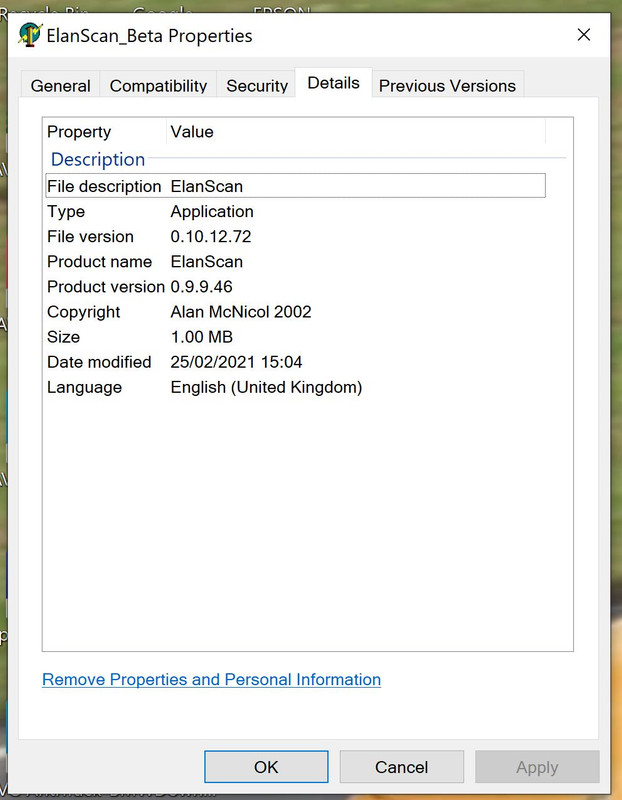
Not sure where to look for driver versions but happy to do so if pointed in the right direction
Not sure where to look for driver versions but happy to do so if pointed in the right direction
Mike - MPx
95 M100 Elan S2 (423)
86 Turbo Esprit
but no longer Carlton no 808 nor Sunbeam S1
95 M100 Elan S2 (423)
86 Turbo Esprit
but no longer Carlton no 808 nor Sunbeam S1
-

MPx - God
- Posts: 823
- Joined: Mon 05.06.2006, 22:50
- Location: Somerset, England
Re: elan scan drivers
by chrism » Fri 14.07.2023, 23:48
Thanks MPx, Yes I've seen this beta copy somewhere, I'll try to find it again and try it out.
In view of the difficulty of loading ES directly into win 10/11 is iy possible that you might have originally loaded it into win7 which subsequently upgraded itself to win10? Can you confirm please? Plus, did you separately load any FDTI files?
I wonder if anybody on this forum loaded ES directly into win10/11 and got the ALDL to 'start talking' or logged any data? I know that mine reads previously logged ecu files - that's why I thought it way okay - but currently won't do the talking stuff with a new file.
I seem to remember that there was a change in the win10 architecture which meant that once upgraded to win7 you couldn't revert back. I wonder if this is the cause of our woes? Trouble is, I've tried downloading a copy of win7 and it doesn't complete due to 'time-out' of M/soft support with upgrades, so I can't try out an ES load on it to see if it's the problem.
I'm getting the feeling that all the working ES originated in win7 and were converted upwards to win10/11...
In view of the difficulty of loading ES directly into win 10/11 is iy possible that you might have originally loaded it into win7 which subsequently upgraded itself to win10? Can you confirm please? Plus, did you separately load any FDTI files?
I wonder if anybody on this forum loaded ES directly into win10/11 and got the ALDL to 'start talking' or logged any data? I know that mine reads previously logged ecu files - that's why I thought it way okay - but currently won't do the talking stuff with a new file.
I seem to remember that there was a change in the win10 architecture which meant that once upgraded to win7 you couldn't revert back. I wonder if this is the cause of our woes? Trouble is, I've tried downloading a copy of win7 and it doesn't complete due to 'time-out' of M/soft support with upgrades, so I can't try out an ES load on it to see if it's the problem.
I'm getting the feeling that all the working ES originated in win7 and were converted upwards to win10/11...
-
chrism - God
- Posts: 923
- Joined: Sun 16.01.2022, 14:36
- Location: West Sussex, UK
Re: elan scan drivers
by MPx » Sat 15.07.2023, 08:44
I'm sure I loaded this ES version from a link somewhere on this (LEC) site - may have been Alan's MC bit - took me a while to find and wasn't the one I've seen referred to most recently? The installation was definitely not from Windows 7 and I've had ES (poss other versions) on previous laptops and the last of those was W8. I don't remember loading any separate drivers, but can't be sure I'm afraid. I do remember it took me a while to make it work as it used a different comm port to previous. So for me at least a successful load directly into W10.
Mike - MPx
95 M100 Elan S2 (423)
86 Turbo Esprit
but no longer Carlton no 808 nor Sunbeam S1
95 M100 Elan S2 (423)
86 Turbo Esprit
but no longer Carlton no 808 nor Sunbeam S1
-
MPx - God
- Posts: 823
- Joined: Mon 05.06.2006, 22:50
- Location: Somerset, England
Who is online
Users browsing this forum: No registered users and 1 guest