Introducing ElanBT

Moderators: theelanman, dapinky, Specky, clemo, Nige, Sy V, Dave Eds, DaveT, Elanlover, muley, Enright, algirdas, nitroman, GeoffSmith

Introducing ElanBT

Postby matts1972 » Fri 14.10.2022, 16:08

Hi all,

I have decided to start a new thread for this, as the ElanLogger thread has grown quite a bit already.

So here it is as promised: ElanBT, the cheap and ugly bluetooth ElanScan interface, that lets you connect wirelessly to your Elan:
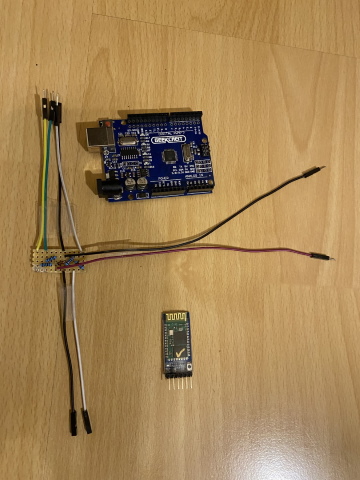
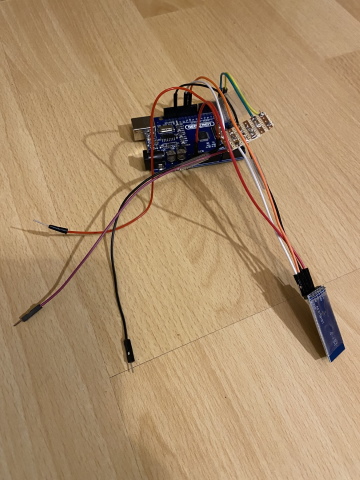
Image Image

The picture on the left shows the parts required, and the one on the right shows the assembled and "finished product".

The three dangling lines on the right hand side picture go to the ALDL connector on the Elan. For testing purposes, I chose to do without a proper OBD1 connector.

You can easily build ElanBT yourself. This post contains all the information you need.

Parts list:
1 Arduino Uno development board
1 HC-05 Bluetooth module
2 100 ohm resistors
1 5.1v zener diode (1N4733A)
1 1k ohm resistor
1 2k ohm resistor
1 OBD1 connector
1 power switch
9 jumper cables to connect everything

Schematics:
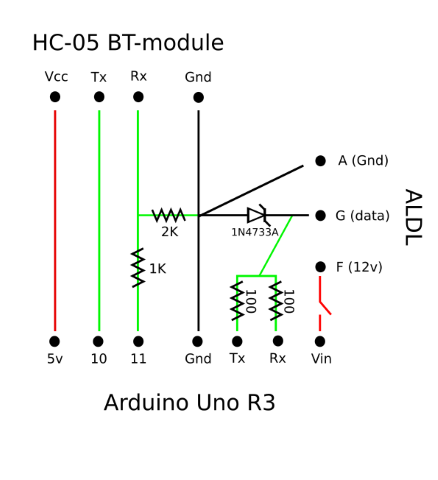
Image

Trivial Arduino sketch: ElanBT.zip

As soon as you switch ElanBT on, you will be able to connect your laptop to the bluetooth device "HC-05" (pin:1234), and this will automatically add a COM-Port for ElanScan.

Do not get discouraged by the looks of it. This thing works great and is quite simple to build (and it made the Kessel Run in less than twelve parsecs).

If you want the whole thing in a less ugly and more compact form, you could replace the Arduino Uno with an Arduino Nano, add a simple voltage regulator (to bring down battery voltage to less than 12v for the Nano) and solder everything together inside an OBD1 connector.

Disclaimer: I have provided this information with best intentions, please use it at your own risk. In other words: try not to short your ECU.
User avatar
matts1972
Enthusiast
 
Posts: 147
Joined: Wed 10.03.2010, 19:44
Location: Heilbronn, Germany

Re: Introducing ElanBT

Postby HJ2 » Fri 14.10.2022, 17:22

This is great Matts!

Thanks a lot, something to tinker around with :bowdown:
If you always do what you always did, you always get what you always got
User avatar
HJ2
Wodan - God of the Low Lands
 
Posts: 4405
Joined: Fri 06.06.2008, 10:54
Location: Delft, the Netherlands

Re: Introducing ElanBT

Postby matts1972 » Fri 14.10.2022, 17:28

HJ2 wrote:This is great Matts!

Thanks a lot, something to tinker around with :bowdown:


Yes, please do - from my recollection you should have most of the parts already purchased, HJ :D
User avatar
matts1972
Enthusiast
 
Posts: 147
Joined: Wed 10.03.2010, 19:44
Location: Heilbronn, Germany

Re: Introducing ElanBT

Postby FunElan » Fri 14.10.2022, 17:58

This is great, thanks for sharing. Could be a foundation for a project I'm considering taking on....a digital oil temp/pressure/water temp gauge where the clock resides. Does anyone actually use the clock?
FunElan
Fanatic
 
Posts: 450
Joined: Sat 20.02.2021, 00:46
Location: Los Angeles, CA

Re: Introducing ElanBT

Postby Fredjohn » Fri 14.10.2022, 18:47

Matt great work. I am not particularly electronically minded, but perhaps you could copy your post with a few extra simple instructions and pictures and save it in the WikiLEC so it doesn't get lost in the depths of threads and posts.
La vie passe vite: vivez la avec élan.

Elan SE turbo 1992
Emira 2023
Mercedes Benz C200 estate
Lotus Evija Danish edition
User avatar
Fredjohn
God
 
Posts: 2537
Joined: Tue 21.08.2012, 00:30
Location: Malvern, Worcs

Re: Introducing ElanBT

Postby muley » Fri 14.10.2022, 20:06

Great news

I can recycle most of my wired version to do this


Very clever, thank you
LEC Turbo Nutter
1991 Aqua Blue 2006 Ford Focus 2.0 Duratech 2013 Alfa Romeo Giulietta 1.4
muley
Moderator
 
Posts: 4518
Joined: Tue 22.04.2003, 09:07
Location: Wokingham, Berks and Waikanae Beach

Re: Introducing ElanBT

Postby matts1972 » Sat 15.10.2022, 08:53

Fredjohn wrote:Matt great work. I am not particularly electronically minded, but perhaps you could copy your post with a few extra simple instructions and pictures and save it in the WikiLEC so it doesn't get lost in the depths of threads and posts.

I could not agree more and would like to put this on Wikilec. So far my requests for an account on Wikilec were unsuccessful, though, but I have sent another one yesterday.
User avatar
matts1972
Enthusiast
 
Posts: 147
Joined: Wed 10.03.2010, 19:44
Location: Heilbronn, Germany

Re: Introducing ElanBT

Postby dapinky » Sat 15.10.2022, 10:39

Matt,

I have no control over the WikiLec accounts (that's Geoffs domain) - but if you want to create a simple set of instructions etc (Word, pdf or whatever file type) I can add it to the 'Manuals' website for inclusion there. Then create a WikiLec entry to link the two so it is easy to find.
Dave

Just the one now, but this one's mine! - and it will be finished eventually..... - but also temporary custodian of a project until it is finished enough for Angie to drive it


...oh, and a 2006 Freelander destined for the jungles of The Gambia - 4500 miles across roads, desert and tracks - what could possibly go wrong?
User avatar
dapinky
LEC Administrator
 
Posts: 10605
Joined: Sun 15.10.2006, 12:54
Location: As far west as you can get in West Wales before you become Irish (Pembroke Dock).

Re: Introducing ElanBT

Postby matts1972 » Sat 15.10.2022, 10:58

Thank you, Dave, I will do this and contact you via PM.
User avatar
matts1972
Enthusiast
 
Posts: 147
Joined: Wed 10.03.2010, 19:44
Location: Heilbronn, Germany

Re: Introducing ElanBT

Postby HJ2 » Sat 15.10.2022, 12:53

matts1972 wrote:
HJ2 wrote:This is great Matts!

Thanks a lot, something to tinker around with :bowdown:


Yes, please do - from my recollection you should have most of the parts already purchased, HJ :D


Your memory serves tou well.
Too many projects!
If you always do what you always did, you always get what you always got
User avatar
HJ2
Wodan - God of the Low Lands
 
Posts: 4405
Joined: Fri 06.06.2008, 10:54
Location: Delft, the Netherlands

Re: Introducing ElanBT

Postby Tuga2112 » Mon 17.10.2022, 15:16

matts1972 wrote:If you want the whole thing in a less ugly and more compact form, you could replace the Arduino Uno with an Arduino Nano, add a simple voltage regulator (to bring down battery voltage to less than 12v for the Nano) and solder everything together inside an OBD1 connector.


its worth noting that the voltage regulator on the uno is extremely inneficient. therefore usind a nano + a PWD based regulator (also easily supplied on ebay) will be more energy efficient.

obviously... if you are driving a 30 year old car.. do you really care about efficiency ? :lol:
Still learning
Youtube Channel @Tuga2112 M100 repair videos
User avatar
Tuga2112
God
 
Posts: 3039
Joined: Fri 12.09.2014, 22:54
Location: Durham with a regular trip to Walsall

Re: Introducing ElanBT

Postby matts1972 » Mon 17.10.2022, 17:22

Tuga2112 wrote:its worth noting that the voltage regulator on the uno is extremely inneficient. therefore usind a nano + a PWD based regulator (also easily supplied on ebay) will be more energy efficient.

obviously... if you are driving a 30 year old car.. do you really care about efficiency ? :lol:


Agreed, an additional 5 volts DC step down converter would be preferred. The Arduino Uno can handle 14 volts, so it can do without this extra component. The energy used is still negligible compared to any other electrical consumer in our cars.
For a small form factor you would replace the Uno with a Nano + DC converter. You could go even smaller with a Beetle BLE + a DC converter, as the Beetle BLE already includes the Bluetooth module.
User avatar
matts1972
Enthusiast
 
Posts: 147
Joined: Wed 10.03.2010, 19:44
Location: Heilbronn, Germany

Re: Introducing ElanBT

Postby matts1972 » Tue 18.10.2022, 10:40

I am happy to report that I have tested this interface to work with ALDL Scan on Android. It is safe to say that it will also work with ALDLdroid, after building an .adx-file with information taken from the ElanScan .ini-file.

For my test I created an .aldl-file for ALDL Scan, that for the moment (and out of laziness) only displays PROM ID and TPS voltage. This worked flawlessly right away.
Find my .aldl-file below, to try this yourself (and perhaps add some additional sensors).

LotusM100test.zip
You do not have the required permissions to view the files attached to this post.
User avatar
matts1972
Enthusiast
 
Posts: 147
Joined: Wed 10.03.2010, 19:44
Location: Heilbronn, Germany

Re: Introducing ElanBT

Postby RonR » Mon 04.12.2023, 15:15

Hi Matt,

Given the problems that many people are having with the FTDI Elanscan cables and Windows 10/11 laptops (USB3 further complicates and worsens the problems), have you used your ElanBT with Win10 or 11, and were there any problems getting it to talk to Elanscan?
User avatar
RonR
Fanatic
 
Posts: 723
Joined: Mon 22.08.2016, 20:25
Location: Bromley

Re: Introducing ElanBT

Postby KenS » Wed 06.12.2023, 15:12

Hi Ron, I am running a variation on Matts BTElanscan, using an ESP32 which incorporates the Bluetooth, and a DC-DC regulator to protect against supply voltages upto around 18V. I have run it with a laptop and a notepad but only with Windows 10 with Bluetooth V4 and V5.0 dongles, without any problems. Seems to run cleaner than FTDI interfaces, with virtually no error/faults reported. Only have to be careful in selecting the correct comm port since it opens up 2, of which only one is active with the scan data. I can send you an interface if you want to try it for compatability with other laptop/windows/driver sets, just let me know.
For reference I have attached a file set for the ESP32, including Arduino code for the ESP32 and schematic.

complete-sml.jpg

board-Bsml.jpg

ESP32-BTelanscan.zip
You do not have the required permissions to view the files attached to this post.
S2 M100 NMY #285
N/A 2010 Evora
User avatar
KenS
Fanatic
 
Posts: 278
Joined: Mon 27.10.2014, 21:04
Location: North Kent Coast

Re: Introducing ElanBT

Postby RonR » Wed 06.12.2023, 15:37

Ken,

Great minds and all that.....
ESP32C3.jpg

You're way ahead of me on this so thanks for the download, it'll save me some time!

Edit: We even use the same DC-DC board!
You do not have the required permissions to view the files attached to this post.
User avatar
RonR
Fanatic
 
Posts: 723
Joined: Mon 22.08.2016, 20:25
Location: Bromley

Re: Introducing ElanBT

Postby KenS » Wed 06.12.2023, 15:59

Ron, your C3 variant will be the smallest! - getting them running on Android would be good, so I am playing with ALDL Scan, but early stages and struggling, I thought the Esprit.aldl would work but it only twitches, so it needs some custom Elan files. At least its something to play with while the roads are not so good!
S2 M100 NMY #285
N/A 2010 Evora
User avatar
KenS
Fanatic
 
Posts: 278
Joined: Mon 27.10.2014, 21:04
Location: North Kent Coast

Re: Introducing ElanBT

Postby RonR » Thu 07.12.2023, 12:44

Hi Ken,

I tried your code on the C3, and when it threw up errors I found out that ESP32-C3 is a no-go I'm afraid, although it has Bluetooth it's only the Low-Energy version - BLE, which doesn't support serial over Bluetooth!

Back to the drawing board....
User avatar
RonR
Fanatic
 
Posts: 723
Joined: Mon 22.08.2016, 20:25
Location: Bromley

Re: Introducing ElanBT

Postby KenS » Thu 07.12.2023, 16:57

Hi Ron, its surprising that the newer ESP devices are not backwardly compatible with the original and no longer capable of classic BR bluetooth. Wonder if laptop support for classic bluetooth will end soon - or has it already?
S2 M100 NMY #285
N/A 2010 Evora
User avatar
KenS
Fanatic
 
Posts: 278
Joined: Mon 27.10.2014, 21:04
Location: North Kent Coast

Re: Introducing ElanBT

Postby matts1972 » Wed 03.01.2024, 20:02

RonR wrote:Hi Matt,

Given the problems that many people are having with the FTDI Elanscan cables and Windows 10/11 laptops (USB3 further complicates and worsens the problems), have you used your ElanBT with Win10 or 11, and were there any problems getting it to talk to Elanscan?


Hi Ron, hi Ken,

Sorry, I missed your posts earlier and just was catching up on what has been going on with the Elanscan driver issues. As it has already been pointed out by now, Win10 and Win11 both work fine with the Bluetooth interface and Elanscan.

On a side note: I am stunned by Ken's professional interface design. You really turned this into perfection :clap: This is the dream.

Have you already tried the "ALDL Scan" Android app with the config that I started? An Android app really brings additional use cases to the table.

Cheers and happy new year

Matt
User avatar
matts1972
Enthusiast
 
Posts: 147
Joined: Wed 10.03.2010, 19:44
Location: Heilbronn, Germany

Next

Return to ElanScan

Who is online

Users browsing this forum: No registered users and 0 guests