So... I read and (mostly) understood the FTDI document, and set about coming up with a usable Advanced Configuration for the Virtual Comm port.
Because the Elan ECU doesn't have "Modem control" type signals (CTS, DTR, etc) and doesn't use flow control in the data stream, there's no way for the USB/FTDI drivers to know if/when an ES data "Packet" is complete. The data builds up in the USB Buffer and is only sent when it fills up or the latency timer expires.
So we're reliant on the USB Buffer sizes and the Latency timer to dictate when the FTDI drivers pass data to the ECU or the Elanscan program. As the document says, you have to strike a balance between Buffer sizes and Latency timer to give the best results.
Our largest received data packet for ES is 67 Bytes, so we don't need a huge buffer size and can safely choose 128, for sending the request it's only 4 bytes, so the smallest buffer available is 64, which will do.
Elanscan sends the request for data to the ECU then waits a certain (unknown) time for the reply, after which it reports "No Reply". Ideally the latency timer needs to be set shorter than that time, but long enough so that we don't receive partial packets. By trial and error I found a range where errors were at a minimum, from 40 to 75 milliseconds, so to be on the safe side I've used 50ms.
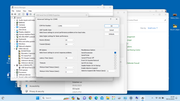
Using Trevor's Elanscan cable plugged into a USB3 port on my Win10 Laptop I managed to get 20 minutes of Elanscan data with no errors at all - The settings were:
Win10-USB3-ComX-Advanced.jpg
Could a Win11 & USB3 user who hasn't been able to get reliable data please try these settings and report back please?You do not have the required permissions to view the files attached to this post.


 - and win11 doesn't need to paralyze us with ES 'cold turkey.'
 in at least a couple of ways, I reckon.

 ) I reckon it'd help, too, if you posted yours up as an example for those of us newbies just starting out. I won't know what to do, either, if it tells me I've got a fault...(I bet there's an 'Idiot's Guide to ElanScan' tucked away somewhere on LEC that I haven't found yet!)

 It looks like my dongle will work. Both yours and mine are recognized as 'Generic Bluetooth Radio'. Yours has bluetooth 4.0 written on it and mine has nothing but being so old it must be an earlier version?